

Staking ZEN requires ZEN (the asset) and a small amount of ETH (for gas) on Horizen Mainnet. If your funds are on Base or a CEX, you must bridge them over first.
Prerequisites
Before you begin, ensure you have the following ready:
-
A Web3 Wallet installed (MetaMask, Coinbase Wallet, WalletConnect, etc.)
-
ETH on Base (to cover initial bridging gas fees)
-
ZEN tokens on Base (ready to be bridged and staked)
Detailed instructions for each step are provided right below.
Step-by-step Walkthrough
Step 1: Add Network & Tokens to Your Wallet
-
Navigate to the Horizen Staking Landing Page and click Connect Wallet in the top-right corner.

-
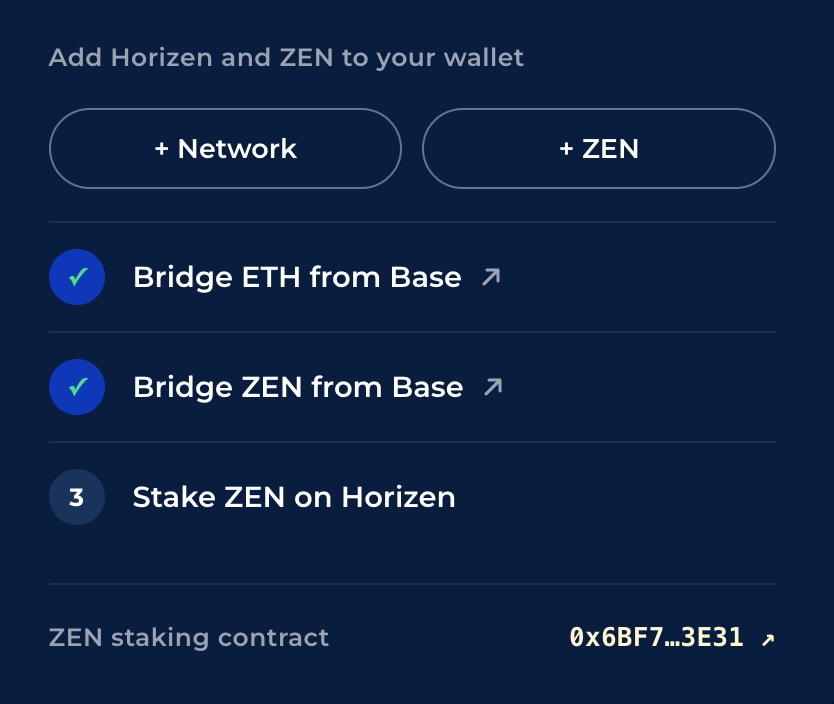
In the onboarding panel on the right, click
+ Networkto automatically add the Horizen network RPC to your wallet. -
Click
+ ZENto import the native token contract address into your wallet display.

-
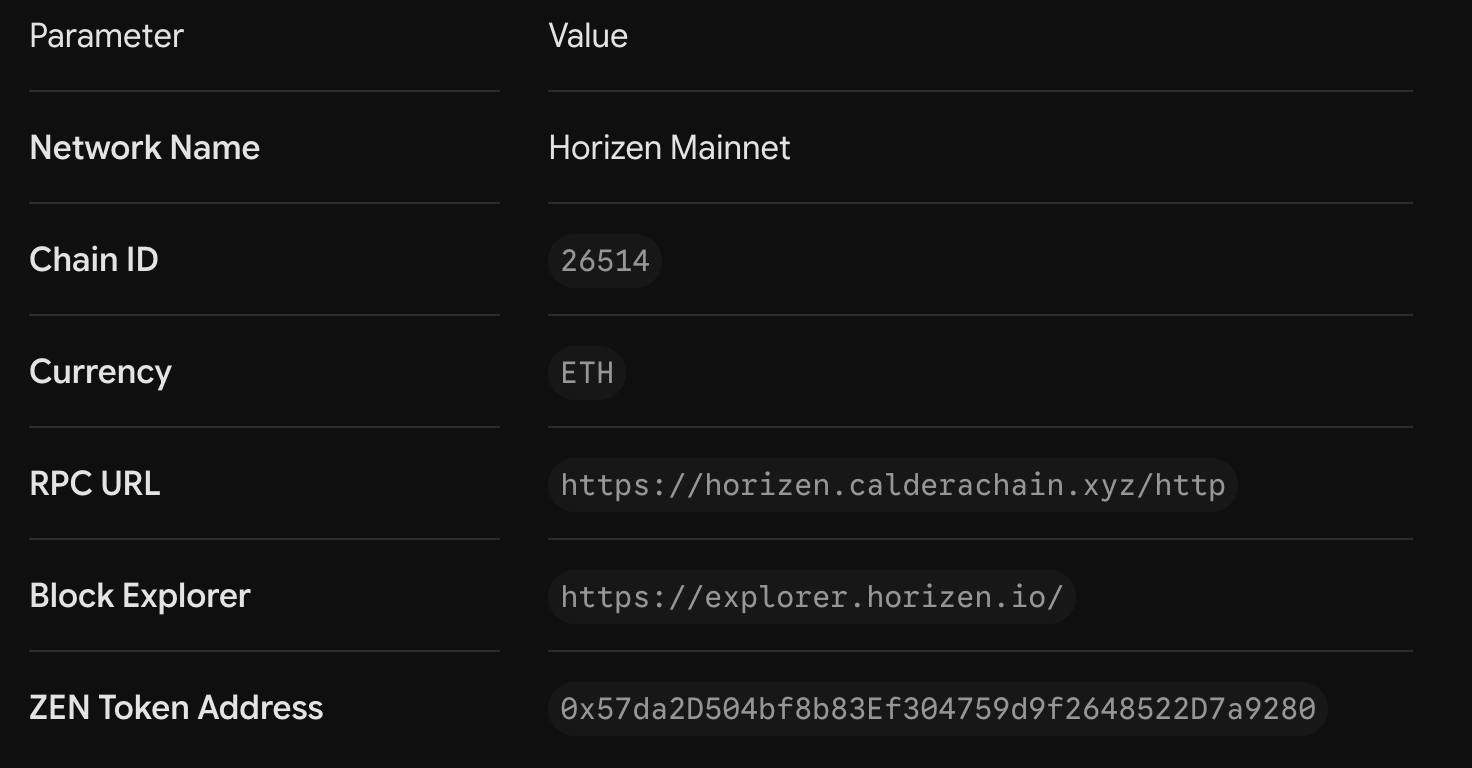
If your wallet doesn't support automatic network switching, add Horizen Mainnet manually using these parameters:
Step 2: Bridge ETH & ZEN from Base
Because Horizen operates on an L3 architecture, your assets need to be moved from Base over to Horizen before staking.
Note on ETH Gas: Moving ETH back to Base later takes ~7 days via the Hub. Only bridge a small amount of ETH, just enough to cover a few transaction gas fees.
-
Need Gas Fee Token (ETH)? In the onboarding panel, click
Bridge ETH from Base.-
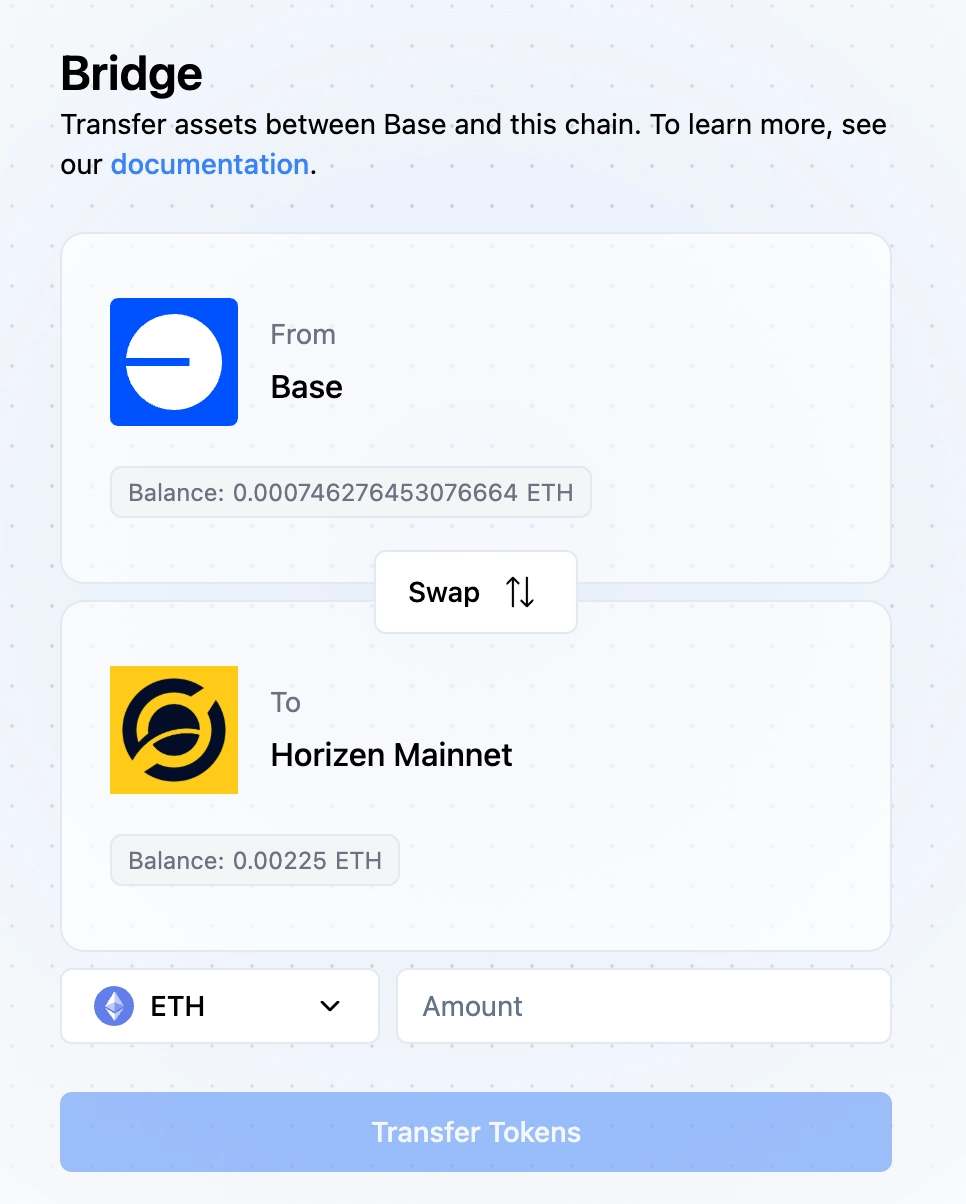
This opens the official bridge interface to transfer ETH for gas fees (or you may head directly to https://bridge.horizen.io/)
-
Set direction: Base → Horizen. Select ETH, enter amount, click
Transfer Tokensand confirm. (Takes ~1–2 minutes).
-
-
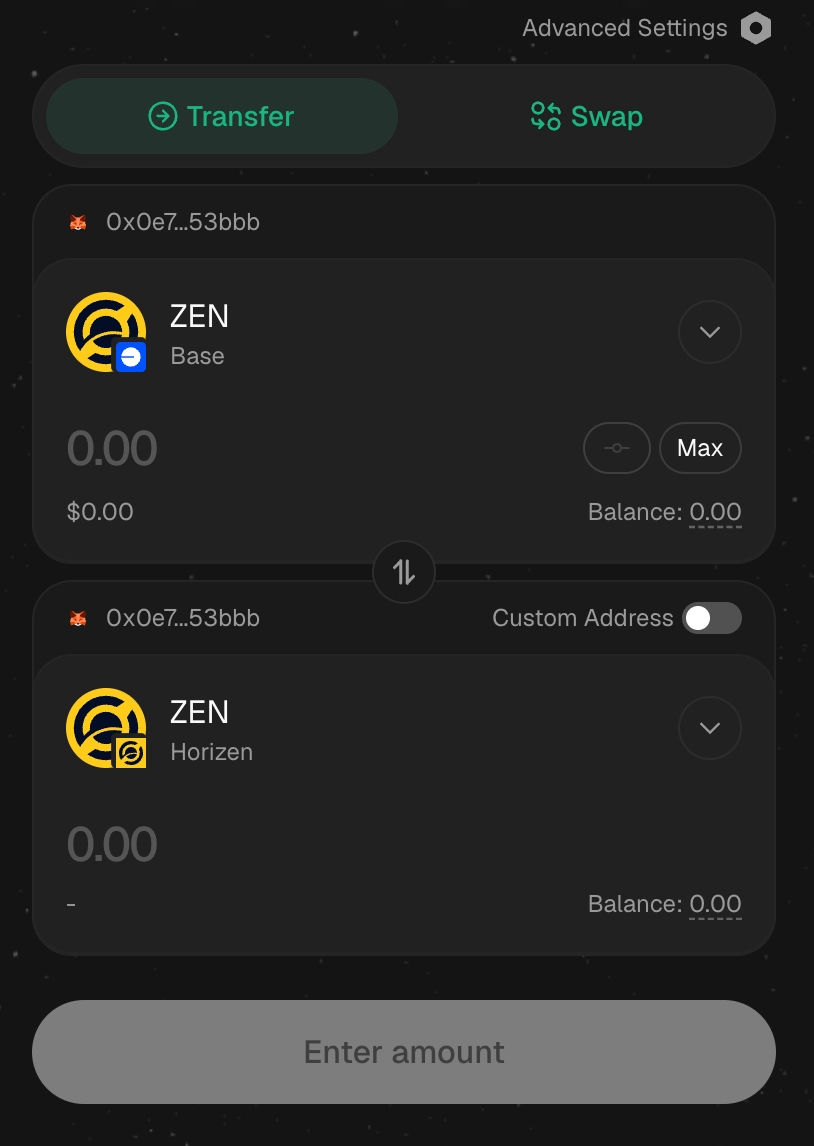
Need Staking Token (ZEN)? return to the panel and click
Bridge ZEN from Baseto open Stargate.-
Connect wallet and bridge your ZEN from Base → Horizen. (Fee is 0.06% + Base gas; takes ~2 minutes).
-
All onboarding steps for bridging and staking are responsive to your wallet holdings with a green check.
Step 3: Stake Your ZEN
-
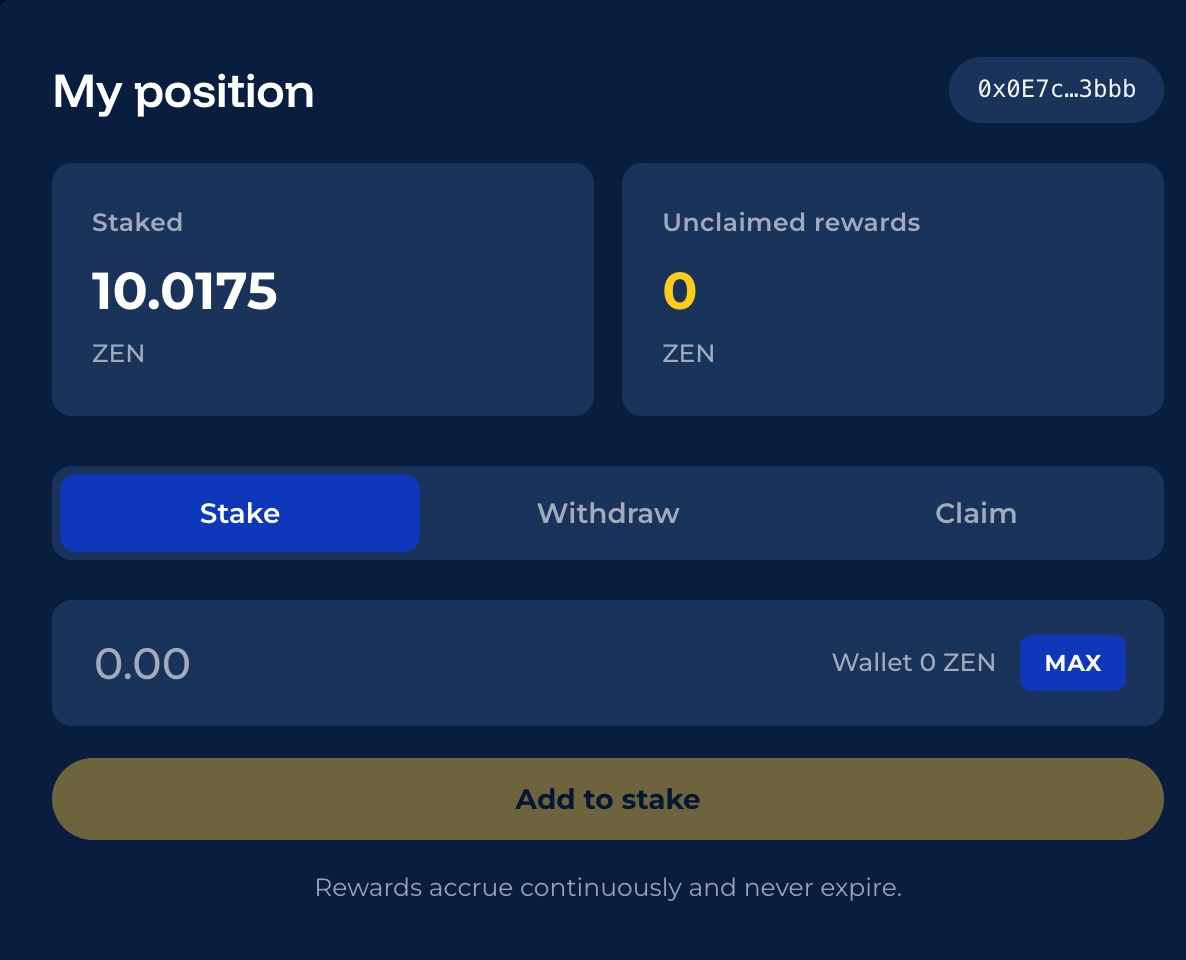
Once ETH and ZEN are both in your Horizen Mainnet wallet, scroll down to My Position panel.
-
Make sure the
Staketab is selected.

-
Enter the amount of ZEN you wish to lock up, or click the
MAXbutton to stake your full balance. -
click
Add to stake -
Approve token spending in your wallet.
-
Confirm the stake in your wallet.
-
Confirm the transaction prompt inside your connected wallet.
Success! Once the transaction is confirmed on-chain, your staked balance and real-time yield will immediately update under My Position.
Managing Your Stake & Unstaking
-
Claiming Rewards: Click Claim to pull earned yield into your wallet without disturbing your staked principal.
-
Unstaking ZEN: Click Withdraw to unstake. There is no lock-up period for ZEN.
-
Bridging Assets Back:
-
ZEN → Base: Use Stargate (Instant).
-
ETH → Base: Use Hub (~7-day challenge period + manual claim).
-
Troubleshooting & FAQs
Common reasons include:
-
Your wallet is still connected to Base (Chain ID
8453) instead of Horizen (Chain ID26514). -
You don't have ETH on Horizen to pay for gas.
-
Your ZEN is still sitting on Base or a CEX.
-
You didn't complete the initial Approve transaction prompt.
Don't panic! Check the following:
-
Ensure your wallet network is switched to Horizen Mainnet (26514).
-
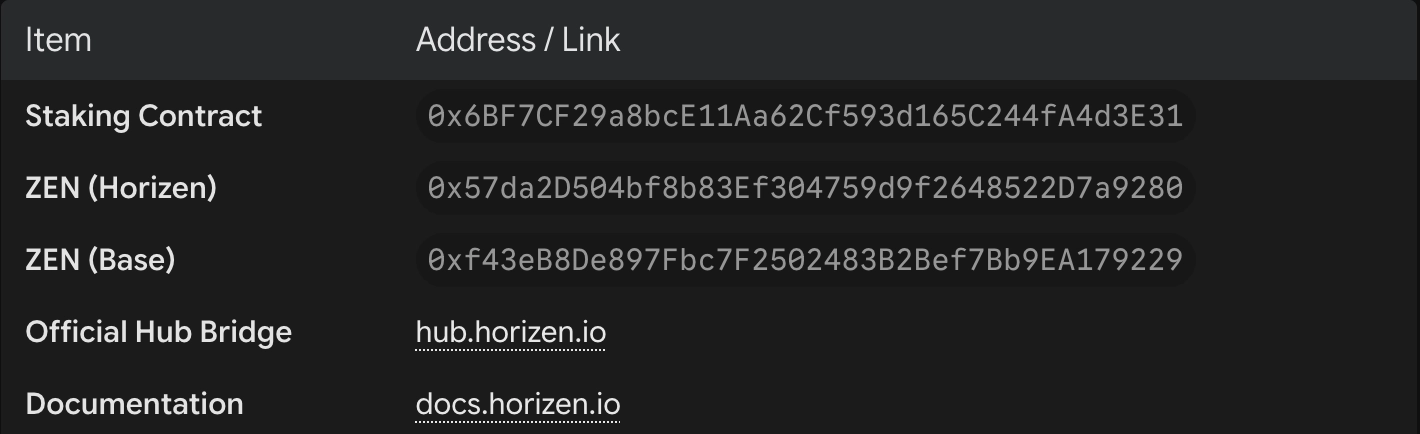
Manually import the ZEN token contract address:
0x57da2D504bf8b83Ef304759d9f2648522D7a9280. -
Check your transaction status on Stargate to ensure it completed.
Rewards accrue continuously from multiple ecosystem sources:
-
Horizen DAO – ZEN Bootstrap (Live)
-
Horizen DAO – ZEN LP Earnings (Live)
-
zkVerify Node Emissions (Live)
-
Horizen L3 Sequencer Fees (Live)
-
Protocol & App Fee Sharing (Onboarding)
-
Vela Confidential Compute (In Development)
For complete breakdown mechanics, review ZenIP-42408.
Reference & Official Contracts
As always, should you have any questions on staking, please reach out to the team via the Horizen Discord.